

Work with audio? Welcome to your new home.
Why store your most important work in the cloud just so you can collaborate? Why risk AI training on your most important production work on servers you don't control?
Keep all your projects on Haven, right in your studio.
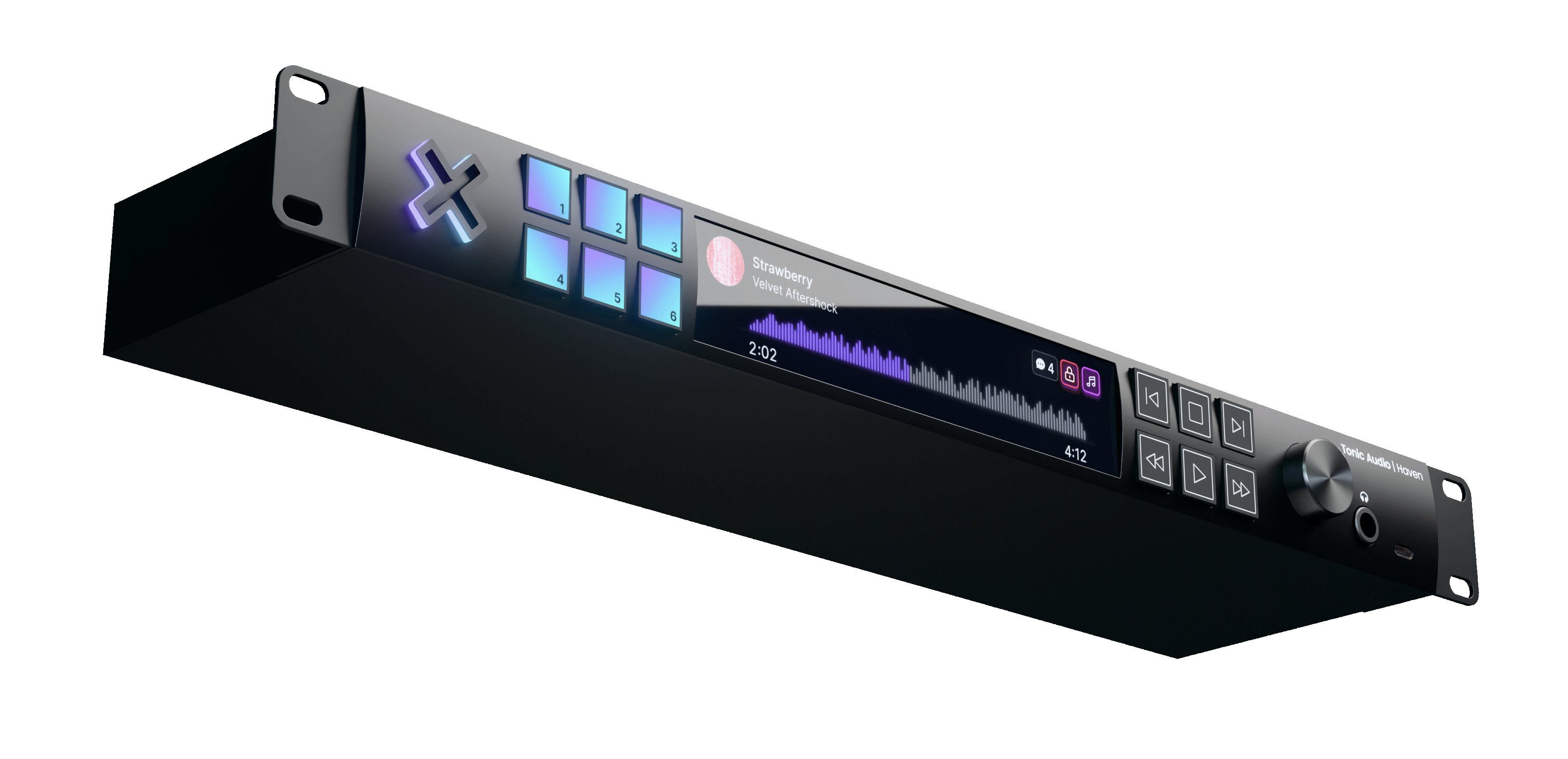
Supports all major DAWs (and most esoteric ones)
Your own private storage, right in your studio.
No more running out of space on your DAW disk, or pulling projects out of archive for remixes. Everything is here, instantly accessible and bullet-proof reliable.
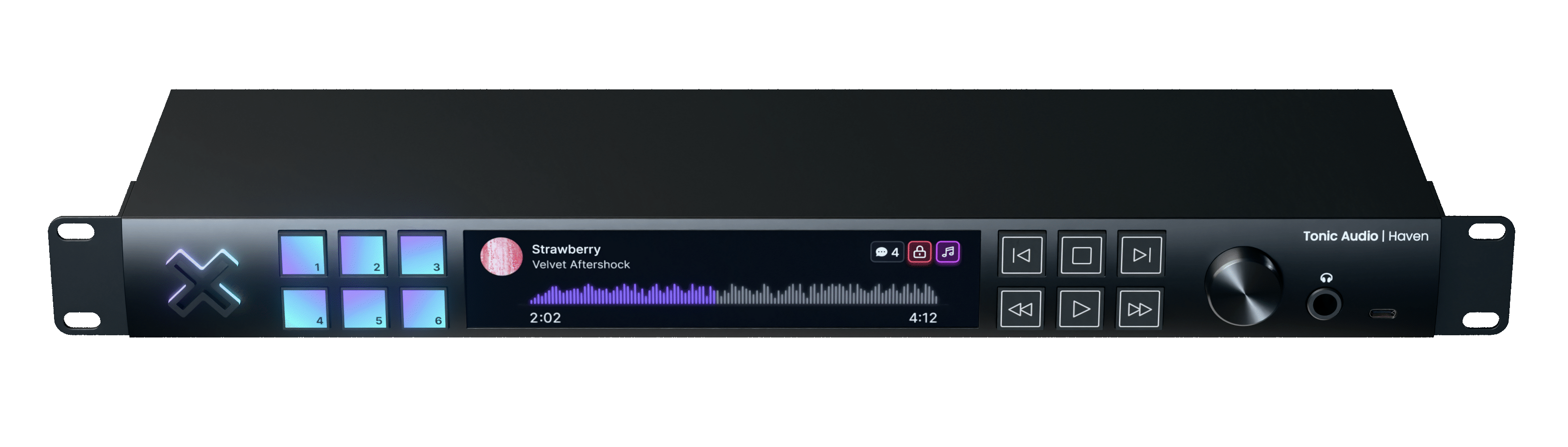
- Extraordinary Speed.
- With up to eight NVMe flash drives and an 80Gb/s Thunderbolt 5™ connection, easily work on the largest projects with no dropouts.
- Beautiful Touch Display.
- Quickly search, audition, and scrub through rough mixes or final masters with a gorgeous and intuitive touch display.
- Tactile Feel.
- Prefer a more traditional transport? Quickly seek and play any part of a file just by feel. Even skip tracks in your playlists to show a client that prior work you've done.
- Custom Function Keys.
- Assign up to six custom actions to these keys: load a current project's latest rough mix into the player, load your discography playlist, or automatically save the latest mix of a project to a USB thumb drive.
- Advanced security.
- All files stored on Haven are encrypted at-rest on the drives in the device itself, as well as in-transit prior to uploading remotely during backing up. No need to trust the backup provider, as they won't be able to decrypt anything.
- Quickly Audition.
- No need to open that large DAW project just to hear vocal takes or mix revisions. Audition via headphones or balanced 1/4" outs with superior-grade DACs.
- Rackmount or Desktop.
- Easily mount Haven in a standard 19" rack. Or if you prefer it front and center, remove the rack ears and place it directly on your studio desk or under your monitor.
- Hardware Volume Control.
- Control either the headphone volume or the balanced line outs to easily manage the proper listening levels when auditioning.
- USB Thumb Drive Access.
- Need to load a collaborator's project directly from a thumb drive? Plug it right into the front to copy at blazing 20Gb/s USB 3 speeds.
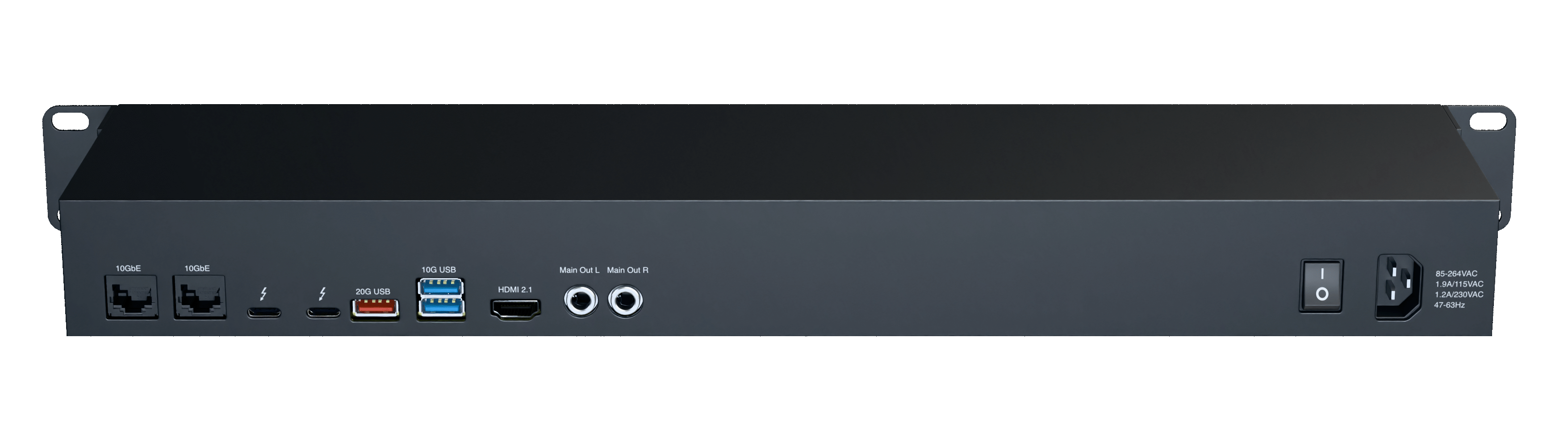
- Dual 10GbE Network Ports.
- In addition to directly connecting via Thunderbolt 5™, Haven can easily be added to studio networks to make it available anywhere. Bond the two ports for 20Gb/s, or have a redundant failover.
- Dual Thunderbolt 5 Ports.
- Plug your DAW directly into the 80Gb/s Thunderbolt 5™ port on the back to provide blazing speed, as if you had a local disk installed, but with all the redundancy and features Haven provides.
- USB 3 20Gb/s Port.
- Want to connect a permanent external drive to regularly back up or sync from? This port provides the speed and simplicity of USB to do just that.
- USB 3 10Gb/s Ports.
- If for any reason you want to connect traditional USB devices to Haven, two USB ports are available. Perhaps a keyboard and mouse for truly standalone use without a separate computer.
- HDMI 2.1 Port.
- Use the built-in HDMI port to output a beautiful 4k dashboard of current disk, CPU, and network usage, and other diagnostics.
- Standalone Mode.
- If desired, run Haven in standalone mode, with an HDMI monitor and keyboard/mouse plugged right in. This provides access to the full interface without any other computer needed.
- Stereo Balanced 1/4" Outputs.
- Using ESS's exceptionally low-noise and ultra-low noise DACs, Haven can provide a +130dB dynamic range, a -126dB total harmonic distortion, and 32 bit processing.
- International Power Support.
- Regardless if you need to run your Haven on European 220V/50Hz power, Japan's 100V/50Hz in Tokyo or 100V/60Hz in Osaka, or the US's 120V/60Hz, just plug in and you're ready to go.
- Ultra quiet cooling.
- Haven is a powerful machine, exceeding most of the best NAS solutions available in the professional audio world today, and with that requires sufficient machine cooling. But we focus on getting the cooling capabilities down so low, Haven just disappears into the background noise floor of your studio.
Frequently asked questions
- Is the Haven NAS a full audio interface?
-
No, this device doesn't replace your audio interface. It is first and foremost a network-attached storage device. However, you can plug directly into it via Thunderbolt 5™, without the need for any external network equipment.
It differs from other storage solutions by offering features specialized to audio production. Among these, it provides a high-quality audio player interface, allowing you to audition any audio file on the NAS directly to your studio monitors or headphones of your choice.
This becomes a huge win when dealing with lots of projects over time. No more pulling projects out of archives or waiting for long cloud downloads. And no need to resort to poorly-compressed streaming platforms to listen to high quality masters.
- What types of storage drives does a Haven NAS support?
-
Haven has eight NVMe M.2 slots that support NVMe 2280 drives up to 8TB each. This means a Haven can support up to 64TB of raw storage in a 1U box.
Not all NVMe drives are the same, however. So while you can use budget drives to save costs, we don't recommend it for long-term durability. Haven offers quality drives designed for NAS usage, and can take an exceptional amount of file writes compared to most drives.
- How does Haven ensure my files are safe in case of a drive failure?
-
Haven uses multiple drives in a redundant fashion to ensure that even if a drive fails, you will not lose any data.
We do this by using a battle-tested file system called ZFS, along with its high-performance RAID configuration. It provides exceptionally important features for just this sort of use-case, like instant filesystem snapshots, copy-on-write clones, and self-healing after a drive failure.
And if you want even more redudancy, you can easily configure Haven to endure more than one redundant drive. All the enterprise features are directly in your control.
- Can I add more storage to a Haven later?
-
Absolutely. Haven's filesystem provides the ability to add drives to a pool to expand available storage anytime in the future.
In fact, Haven's default storage configurations all ship with several open slots available so you can easily add additional capacity when you need it.
- What are the specs of Haven's DACs?
-
Haven uses ESS SABRE DACs that offer exceptional performance, to ensure that while using Haven to audition works in progress, you'll never wonder if Haven is unnaturally coloring the mix.
The headphone driver has a +122dB signal-to-noise ratio (SNR), -117dB total harmonic distortion + noise (THD+N) @ 2Vrms / 600Ω, and -100dB total harmonic distortion + noise (THD+N) @ 30mW / 600Ω.
The stereo 1/4" balanced out DAC uses 32 bit processing, has a +130dB dynamic range (DNR), -126dB total harmonic distortion (THD), -120dB total harmonic distortion + noise (THD+N), and supports up to 768kHz frequency, as well as DSD1024 audio data.
- Why does Haven have a touchscreen?
-
When designing Haven's user experience, we realized that while you can control Haven through a beautiful app via its built-in software, sometimes you just want to audition audio directly.
So we took that idea even further. What if you didn't need to open an app on a computer at all? What if you just wanted to audition mix revisions directly? No computer, no DAW, no distraction. Just you and the music.
A simple touchscreen interface provides the perfect way to navigate your audio without any distractions.
- How do you program the custom function keys?
-
The six function keys can easily be programmed from the accompanying Haven app.
All sorts of functions can be saved to these keys, including automatically loading playlists you've made. Or, save-to-thumbdrive for a particular project or folder. Or perhaps automatically open a current DAW project on your workstation.
The entire front panel of Haven was designed to give you quick and easy shortcuts to many of the more monotonous aspects of audio production, while still providing rock-solid reliability and best-in-class performance.
- Can Haven control my DAW's transport via its transport keys?
-
You can set up Haven as a MIDI transport controller via its USB connection. It supports MIDI Machine Control (MMC) and sending CC messages over MIDI.
- Do I have to use the Thunderbolt 5™ connection to connect via a computer?
-
Not at all. While there are some benefits to doing so, such as controlling DAW transports via MIDI through the front transport buttons, there is no requirement to use the Thunderbolt ports. You can easily connect to Haven through the 10GbE network ports. Do keep in mind though, that you will see much better performance (up to 8x) when connecting through Thunderbolt vs using the network ethernet ports.
- Do I have to use the ethernet connections to connect via a computer?
-
No you don't. If you want to only connect to Haven via Thunderbolt 5™, that is perfectly fine. The network ports allow you to provide Haven's capabilities to any other machine on the network who needs a high-performance NAS. Even use it with other computers that want to use it as a traditional NAS.
- Can I use both the Thunderbolt 5™ and ethernet connections at the same time?
-
Yes, absolutely. Both connection methods will work simultaneously with no problems.
- Can I use Haven without a computer connected to it at all?
-
Yes you can! There are three ways to do this. First, you can treat Haven like a standalone audio NAS. Plug in a keyboard, mouse, and HDMI monitor into the back, and you have direct access to the Haven software directly on the machine. Manage collaborator feedback, new workspace creation, the creation of shared links, and all the features you access from the Haven app.
Second, you can connect to Haven's software using a web browser. You'll get access to every option available as if you were directly connected to the device itself.
Or, treat Haven like a headless unit, and control it from the front touch interface and custom function buttons. While the touch interface won't give you full access to the entire Haven software, it does let you quickly control the most important features directly from the front panel.
Reserve your Haven today.
Tonic Audio is now taking pre-order reservations for Haven. Place a small refundable deposit of $50 to secure your place in line as the first devices begin shipping, and receive a significant discount off of retail price when launched.